Posted in Artificial Intelligence

Best Enterprise AI Code Generation Tools in 2026: Devin (formerly Codeium/Windsurf) vs Tabnine vs Amazon Q Developer

If you searched for “Codeium Windsurf enterprise pricing” expecting a straightforward comparison, you’ve run into the same surprise we did: as of late 2026, Windsurf no longer exists as a separate product. Codeium rebranded to Windsurf in 2024, Cognition (maker of the autonomous coding agent Devin) acquired Windsurf in late 2025 for a reported $250 million, and in June 2026 Cognition rebranded the Windsurf editor itself into “Devin Desktop.” This piece compares what that product has become — now simply part of Cognition’s Devin lineup — against Tabnine and Amazon Q Developer, the two other enterprise-oriented AI coding tools built specifically around on-prem/VPC deployment and compliance, rather than repeating our earlier Cursor vs. GitHub Copilot vs. JetBrains AI Assistant comparison.

At a Glance

ToolVendorEntry enterprise pricingSelf-hosting/VPCKey compliance certs
Devin / Devin Desktop (formerly Codeium/Windsurf)CognitionTeams: $80/mo + $40/seat/mo; Enterprise: customVPC deployment and a “dedicated deployment option” on EnterpriseSOC 2 Type II and ISO 27001 certified on all surfaces; FedRAMP High in progress
TabnineTabnineNot published; contact sales for EnterpriseSecured SaaS, on-premises, or fully isolated in your own VPCSOC 2 compliant (per Tabnine’s own enterprise page)
Amazon Q DeveloperAWSFree; Pro at $19/user/monthVPC interface endpoints via AWS PrivateLink; inherits AWS’s compliance programsCovered under AWS’s shared-responsibility compliance program (SOC, ISO, etc. at the AWS platform level)

Short Verdict

Devin (the product formerly known as Windsurf) is now the most compliance-forward of the three on paper, with SOC 2 Type II and ISO 27001 certification across cloud, desktop, and CLI, plus a FedRAMP High push underway — but it arrived there through two rebrands in under two years, which is worth weighing against stability. Tabnine remains the most deployment-flexible option, with genuine on-premises and air-gapped VPC installs, though its published compliance claims are thinner than its rivals’. Amazon Q Developer is the easiest sell for teams already standardized on AWS, inheriting AWS’s compliance programs and VPC networking rather than building its own from scratch, at the simplest published per-seat price of the three ($19/user/month for Pro).

What Happened to Codeium and Windsurf

This history matters for anyone evaluating the product today. Codeium launched as an AI code-completion tool, rebranded to Windsurf as it pushed into agentic editing, and became one of the most talked-about AI IDEs of 2025 — talked about partly because Google licensed Windsurf’s technology and hired several of its top researchers mid-year, leaving the standalone company in a weakened position. Cognition, the startup behind the autonomous coding agent Devin, acquired what remained of Windsurf in December 2025 for a reported $250 million. On June 2, 2026, Cognition shipped an over-the-air update that rebranded the Windsurf editor as “Devin Desktop”: existing accounts, plans, extensions, and keybindings carried over, but Windsurf’s built-in agent, Cascade, was retired in favor of “Devin Local,” a Rust-rewritten agent Cognition says uses roughly 30% fewer tokens and can spawn subagents. The practical upshot: there is no more “Codeium (Windsurf)” enterprise product to evaluate on its own terms — it’s now a surface inside Cognition’s broader Devin platform, alongside cloud Devin and a CLI.

What Each Platform Actually Offers

Devin / Devin Desktop now spans three surfaces — Cloud, Desktop, and CLI — and supports the Agent Client Protocol (ACP), which lets outside agents such as Codex or Gemini CLI run inside the editor rather than locking you into one vendor’s model. On the enterprise side, Devin’s security documentation states SOC 2 Type II and ISO 27001 certification across all surfaces, with FedRAMP High “in progress” for CLI/Desktop and Cloud. Enterprise deployment connects to internal systems via AWS PrivateLink or IPSec, with an outbound-only policy gateway (“Devin Connect”), and the vendor says single-tenant, region-pinned hosting is available on request. Devin Enterprise also supports self-hosted source control systems directly — GitHub Enterprise Server, GitLab self-managed, Azure DevOps Server, Bitbucket Data Center, Gerrit, and Perforce — which matters for codebase-aware features in locked-down environments. Pricing is published up to the Teams tier ($80/month plus $40/month per full seat, up to 200 users); Enterprise is quote-only.

Tabnine positions itself explicitly as “the AI code assistant that you control,” and deployment flexibility is its central pitch: Tabnine can run as a secured multi-tenant SaaS, fully on-premises, or isolated inside your own VPC with no outbound connectivity required. Its enterprise page states it doesn’t train on your code unless you explicitly connect your codebase, and that connected code stays inside your environment. Tabnine publishes SOC 2 compliance but its own enterprise materials don’t list ISO 27001, HIPAA, or FedRAMP, so compliance-sensitive buyers should confirm current certification status directly with Tabnine rather than assuming parity with Devin or AWS. IDE coverage includes VS Code, the JetBrains family (IntelliJ, PyCharm, WebStorm, and others), Eclipse, and Sublime. Tabnine does not publish per-seat enterprise pricing on its public site; it’s sold through a sales conversation.

Amazon Q Developer is the clearest fit for teams already deep in AWS. Its Free tier includes 50 agentic requests a month and 1,000 lines of code per user for Java upgrade transformations; Pro, at $19 per user per month, raises those limits, adds an admin dashboard with IAM Identity Center integration, automatic opt-out of data collection, and IP indemnity. Q Developer supports VPC interface endpoints through AWS PrivateLink, so traffic can stay off the public internet, and it inherits AWS’s existing compliance programs under the standard shared-responsibility model rather than publishing its own separate certification list — which is a meaningfully different compliance story than a vendor certifying its own product independently, and worth clarifying with your compliance team if you need a certification that names Q Developer specifically rather than “AWS” broadly.

Pros and Cons

Devin / Devin Desktop

  • Pros: Strongest published compliance posture (SOC 2 Type II + ISO 27001 on all surfaces, FedRAMP High in progress); supports self-hosted source control directly; ACP support avoids lock-in to one model vendor.
  • Cons: Two rebrands in under two years (Codeium → Windsurf → Devin Desktop) raise legitimate continuity questions; Enterprise pricing isn’t published; no on-premises option, only VPC/dedicated hosting.

Tabnine

  • Pros: True on-premises and air-gapped VPC deployment; broad, mature IDE support including Eclipse and Sublime; strong “your code stays yours” data-handling stance.
  • Cons: No public pricing; thinner published compliance-certification list than Devin or AWS; less agentic/autonomous capability positioning than Devin.

Amazon Q Developer

  • Pros: Simple, published per-seat pricing ($19/user/month Pro); VPC PrivateLink support; inherits AWS’s broad compliance program rather than building one from scratch; tight integration with other AWS services.
  • Cons: Compliance is inherited at the AWS-platform level, not independently certified for Q Developer specifically; most natural fit is inside the AWS ecosystem rather than as a standalone, cloud-agnostic tool.

Who It’s a Good Fit For

Choose Devin/Devin Desktop if you want the most agentic, autonomous workflow and can live with quote-only enterprise pricing and a security program that’s still completing FedRAMP High. Choose Tabnine if your compliance or infrastructure team requires a genuinely air-gapped, on-premises deployment with no outbound network dependency. Choose Amazon Q Developer if your organization already standardizes on AWS and wants predictable per-seat pricing with compliance handled under your existing AWS agreements.

Who Should Look Elsewhere

If brand stability matters to your procurement process, Devin’s rapid rebranding history (three names in roughly two years) is worth flagging to stakeholders before you commit. If you need a published, comparable enterprise price point without a sales call, Tabnine’s lack of public pricing may be a dealbreaker. And if you’re multi-cloud or cloud-agnostic by policy, Amazon Q Developer’s AWS-centric compliance and integration story may be a poorer fit than Devin or Tabnine.

Bottom Line

“Codeium (Windsurf)” as a distinct product is already history by late 2026 — it’s Devin Desktop now, inside Cognition’s broader agent platform, with a genuinely strong compliance story to show for the turbulence. Tabnine remains the deployment-flexibility specialist for teams that need true on-premises isolation. Amazon Q Developer is the low-friction default for AWS-committed organizations. None of the three is a universal “best” — match the choice to whether your constraint is agentic capability, deployment isolation, or cloud-platform alignment.

FAQ

Is Windsurf still a separate product from Devin?
No. As of June 2026, Cognition rebranded the Windsurf editor as “Devin Desktop,” retiring the Windsurf name and its built-in Cascade agent in favor of Devin Local. Existing Windsurf accounts and plans carried over automatically.

Does Tabnine support fully offline, air-gapped deployment?
Tabnine’s own enterprise materials describe running “fully isolated” in your VPC or on-premises, which is the strongest offline/air-gapped positioning of the three tools compared here.

What does Amazon Q Developer Pro cost per seat?
$19 per user per month, billed with the first month prorated from activation. The Free tier has no per-seat charge but caps agentic requests at 50 per month.

Is Devin Enterprise FedRAMP certified?
Not yet as of this writing. Devin’s security documentation lists FedRAMP High as “in progress” for its CLI, Desktop, and Cloud surfaces, alongside completed SOC 2 Type II and ISO 27001 certification.

Which of these three publishes clear enterprise pricing?
Only Amazon Q Developer publishes a specific enterprise-relevant per-seat price ($19/month for Pro). Devin publishes pricing up to its Teams tier but not Enterprise; Tabnine doesn’t publish enterprise pricing at all.
Sources

Posted in Artificial Intelligence, Cloud & Infrastructure

IBM Power11 and watsonx: What IBM’s Enterprise AI Infrastructure Actually Offers

While AWS, Google, and Microsoft fight over GPU supercluster bragging rights, IBM is running a different playbook: AI infrastructure built around its own Power chips, dedicated AI accelerator silicon, and a software layer (watsonx) aimed squarely at regulated enterprises that want AI running on-premises, not just in a public cloud. Here’s what’s actually in IBM’s stack.

At a Glance

ComponentWhat it isStatus
Power11IBM’s current server CPU familyShipping since July 2025
Telum IIMainframe processor with on-chip AI acceleratorPowers IBM z17 / LinuxONE 5
Spyre AcceleratorDedicated AI accelerator card (32 cores)Commercially available on Z/LinuxONE; rolling out to Power11
watsonxIBM’s AI platform (ai / data / governance / Orchestrate)Runs on Red Hat OpenShift AI, on-prem or IBM Cloud

Short Verdict

IBM isn’t trying to out-GPU Nvidia’s hyperscaler customers, and it shouldn’t be judged on that basis. Its bet is that a large slice of enterprise AI workloads — banking, insurance, government, telecom — need to run where the data already lives, under existing compliance controls, with hardware-level reliability guarantees that general-purpose cloud VMs don’t offer. Power11 plus the Telum II/Spyre accelerator lineup plus watsonx is a coherent answer to that specific problem. It is a weak answer if what you actually want is the cheapest possible path to training a frontier-scale foundation model.

What’s in IBM’s AI Infrastructure Stack

Power11 is IBM’s current-generation Power server CPU family, announced in July 2025 and the first time IBM simultaneously launched high-end, mid-range, and edge/low-end Power models together. The lineup spans the S1112 (edge/remote deployments with built-in AI acceleration), the S1122 and S1124, the E1150 (up to 120 Power11 cores, 16TB of DDR5 per 4U chassis), and the flagship E1180. IBM’s own materials don’t publish per-chip clock speeds or process node for Power11 — a genuine gap in IBM’s public documentation — but IBM does claim, in its own internal benchmarks, up to 55% faster core performance than Power9 on commercial workloads and up to 45% more processor resources than Power10 on its lower-end systems, along with roughly double the performance-per-watt of comparable x86 servers.

IBM’s AI-specific silicon sits one layer up. Telum II, built on a 5nm process and first detailed at Hot Chips in 2024, is the processor inside IBM’s z17 mainframe and LinuxONE 5 systems; it carries an on-chip AI accelerator and, in a fully configured system drawer, is rated for up to 192 TOPS of on-chip AI inference — aimed at running fraud-detection and risk models directly alongside transaction processing, with no round trip to a separate AI system. The Spyre Accelerator is IBM’s dedicated AI accelerator card: 32 AI cores on a 5nm, 75-watt PCIe card, now commercially available for IBM Z and LinuxONE systems (GA’d in late 2025) and extended to Power11 shortly after. Up to 48 Spyre cards can be clustered on Z/LinuxONE, and up to 16 on Power systems, for larger on-premises inference workloads.

watsonx: The Software Layer

watsonx is IBM’s umbrella AI platform, split into several named products: watsonx.ai (a studio for building and deploying custom AI applications, including IBM’s own Granite foundation models), watsonx.data (data integration and governance across hybrid and multicloud sources), watsonx.governance (AI risk management, regulatory compliance, and explainability tooling), and watsonx Orchestrate (building and deploying AI agents for business process automation).

Critically, watsonx is built on top of Red Hat OpenShift, and watsonx.ai specifically uses OpenShift AI’s accelerator support (which includes GPU kernel contributions from Nvidia, AMD, and Intel) and KServe for model serving. That means watsonx isn’t locked to IBM’s own chips — it can serve models like Llama 3 and Mistral alongside IBM’s own Granite models, and can be deployed fully air-gapped for workloads with strict data-isolation requirements. IBM has also confirmed that watsonx.data is being made available directly on Power11 and that Power11 integrates with Red Hat OpenShift AI.

Pros

  • On-chip AI acceleration (Telum II) built directly into transaction-processing hardware, aimed at real-time fraud/risk use cases banks and insurers actually run.
  • watsonx runs on open infrastructure (Red Hat OpenShift AI) rather than a proprietary stack, and supports third-party models alongside IBM’s own Granite models.
  • Strong hybrid/on-prem story: workloads can run fully air-gapped where data residency or regulatory rules require it.
  • Built-in quantum-safe encryption and a hardware-level ransomware detection feature (“Power Cyber Vault”) on Power11.

Cons

  • IBM does not publish basic chip specs (clock speed, process node, per-core detail) for Power11 the way competitors routinely do — third-party outlets fill in some of these numbers, but they aren’t confirmed directly by IBM.
  • Not positioned, and not competitive, for large-scale foundation-model pretraining at the scale AWS, Google, or Oracle’s GPU superclusters support.
  • The AI accelerator story is currently split across two different chip families (Telum II for mainframes, Spyre as an add-in card) rather than one unified roadmap, which adds complexity to evaluating the lineup.

Who It’s a Good Fit For

Banks, insurers, telcos, and government agencies that already run IBM Z, LinuxONE, or Power infrastructure and need AI inference (fraud detection, risk scoring, document processing) running close to transactional data under strict compliance and uptime requirements. Also a fit for enterprises that want a hybrid-cloud AI platform built on open infrastructure (OpenShift) rather than a single public cloud’s proprietary stack.

Who Should Look Elsewhere

Teams training large foundation models from scratch, or anyone who just wants the cheapest/fastest path to a large GPU cluster, should look at AWS, Google Cloud, Oracle, or Nvidia’s own cloud partners instead — IBM’s AI hardware story is about enterprise inference and governance, not frontier-scale training.

Bottom Line

IBM’s AI infrastructure play is narrower than the hyperscalers’ but more coherent for its target customer: enterprises that need AI inference running on the same hardware as their core transaction systems, under compliance regimes that make “just use a public cloud GPU instance” a non-starter. Power11, Telum II, Spyre, and watsonx add up to a real, differentiated hybrid-AI stack — just not a frontier-training one.

FAQ

Is watsonx only for IBM hardware?
No. watsonx runs on Red Hat OpenShift AI and can be deployed on IBM Power, IBM Cloud, other public clouds, or on-premises, and it can serve non-IBM models like Llama 3 and Mistral alongside IBM’s own Granite models.

What’s the difference between Telum II and Spyre?
Telum II is the main processor inside IBM’s z17 mainframe and LinuxONE 5 systems, with an AI accelerator built into the chip itself. Spyre is a separate, dedicated AI accelerator card that plugs into Z, LinuxONE, or Power systems for additional AI inference capacity.

Can IBM’s infrastructure train large language models from scratch?
It’s not positioned or marketed for that. IBM’s AI hardware emphasizes on-premises inference and governance for enterprise workloads; large-scale pretraining is better suited to GPU-cluster-focused clouds like AWS, Google Cloud, or Oracle.

Sources

Posted in Artificial Intelligence, Cloud & Infrastructure

Oracle Cloud Infrastructure for AI: Is OCI a Real Alternative to AWS, Azure, and GCP for GPU Workloads?

Oracle spent most of the cloud era as an afterthought behind AWS, Azure, and Google Cloud. In AI infrastructure, that’s changed: Oracle Cloud Infrastructure (OCI) now runs some of the largest publicly disclosed GPU superclusters in the industry, and it’s become a default landing spot for AI labs that need massive GPU capacity fast. Here’s what OCI actually offers for AI training and inference, and where its claims hold up.

At a Glance

OfferingWhat it isScale (per Oracle)
OCI SuperclusterBare-metal GPU clusters with RDMA networkingUp to ~131,000 NVIDIA B200 GPUs; roadmap to 1M+ GPUs by end of 2027
GPU shapesNVIDIA H100/H200/B200/GB200, AMD MI300XBare-metal, 8-GPU instances, no hypervisor overhead
OCI Enterprise AI / Generative AIManaged LLM, RAG, and AI agent toolingBuilt on OCI Data Science and OCI’s generative AI service

Short Verdict

OCI is a legitimate option for large-scale GPU training, not just a marketing claim. Oracle publishes real bare-metal pricing per GPU-hour (rather than burying it behind a sales call for every tier), its RDMA cluster networking numbers are credible, and it has landed genuine customers like Databricks/MosaicML and Cohere. It is not yet a broad AI platform the way AWS or Google Cloud are — OCI’s AI-specific managed services are thinner, and some of its own marketing pages are inconsistent on basic numbers. For teams that mainly need raw GPU capacity at competitive pricing, OCI is worth a serious look. For teams that want a mature ecosystem of managed AI services around the GPUs, AWS and Google Cloud are still further ahead.

What OCI’s AI Infrastructure Actually Is

OCI’s pitch for AI workloads centers on bare-metal GPU instances — meaning customers get direct hardware access with no hypervisor layer between them and the silicon — connected by Oracle’s own RDMA cluster network. Oracle calls the resulting pooled hardware an “OCI Supercluster.” According to Oracle’s own AI infrastructure page, a single OCI Supercluster can scale up to roughly 131,000 NVIDIA B200 GPUs, more than 100,000 GB200 Grace Blackwell Superchips, 65,536 H200 GPUs, or 16,384 AMD MI300X GPUs, depending on which generation of hardware a customer provisions. Oracle has also stated a roadmap target of extending this architecture to more than 1 million NVIDIA GPUs with over 3 gigawatts of capacity by the end of 2027 — a forward-looking target, not a currently deployed figure.

Worth flagging directly: Oracle’s own AI infrastructure page is not perfectly internally consistent. The written copy cites “up to 131,072” B200 GPUs in one place while an accompanying diagram on the same page shows 128,000 — a minor discrepancy, but one that suggests these maximum-scale figures should be read as approximate marketing ceilings rather than exact, audited numbers.

GPU Shapes and Pricing

Unlike some competitors, Oracle publishes real per-GPU hourly pricing for several of its bare-metal shapes directly in its own product announcements:

  • BM.GPU.H200.8 — 8x NVIDIA H200 GPUs (141GB HBM3e each, 4.8TB/s bandwidth) via NVLink, dual 56-core Intel Sapphire Rapids CPUs, 3TB DDR5 RAM, 8×3.84TB local NVMe. Oracle’s own GA announcement states this ships at $10 per GPU per hour — the same price as the prior-generation H100 shape.
  • BM.GPU.MI300X.8 — 8x AMD MI300X GPUs (192GB HBM3 each, ~1.5TB total), dual 56-core Sapphire Rapids CPUs, 2TB DDR5 RAM. Oracle’s own GA announcement states this ships at $6.00 per GPU per hour.
  • GB200 NVL72 / B200 — Oracle’s current Blackwell-generation shapes, offered via OCI Supercluster at scale; Oracle does not publish a flat per-GPU hourly rate for these on its main marketing pages, and we could not independently confirm a specific dollar figure for this tier from an Oracle-published source.

Oracle’s cluster-level networking claims include RDMA over Converged Ethernet (RoCE v2) using NVIDIA ConnectX-7 NICs, cluster bandwidth up to 3,200 Gb/s per 8-GPU instance, and sub-10-microsecond network latency (Oracle’s own materials give slightly different numbers in different places — as low as 2.5 microseconds in one spot and a 2.5–9.1 microsecond range in another, which is worth noting rather than papering over). RDMA networking, block storage, and the first 10TB of monthly egress are included at no additional charge, which is a genuine differentiator versus cloud providers that meter network egress aggressively.

Managed AI Services on Top of the Hardware

Above the raw GPU layer, Oracle offers OCI Data Science (managed notebooks and an Accelerated Data Science SDK, billed only for the compute and storage actually consumed) and a generative AI layer that Oracle has marketed under more than one name over time — it has documented an “OCI Generative AI Service” for LLM and RAG workflows, and its current top-level marketing increasingly uses the name “OCI Enterprise AI” for AI app, agent, and governance tooling. Readers evaluating this layer specifically should check Oracle’s current docs directly, since the branding appears to be in flux.

On the partnership side, Oracle has a deep full-stack relationship with NVIDIA (NVIDIA AI Enterprise is built into the OCI Console, NVIDIA NIM is available via OCI Marketplace, and GB200/GB200 NVL72 racks are deployed on OCI) and a separate relationship with AMD around the MI300X shape.

Pros

  • Published, bare-metal per-GPU-hour pricing for H200 and MI300X, rather than quote-only pricing for every tier.
  • No hypervisor overhead on bare-metal shapes, and RDMA networking, storage, and the first 10TB of egress included free.
  • Real supercluster scale, with concrete customer wins (Databricks/MosaicML, Cohere, Palantir, Stanford among others cited by Oracle).
  • Both NVIDIA and AMD GPU options, rather than a single-vendor lock-in.

Cons

  • Thinner managed-AI-service ecosystem than AWS Bedrock/SageMaker or Google Vertex AI, and the branding of Oracle’s generative AI layer has shifted, which makes it harder to evaluate from the outside.
  • Oracle’s own marketing pages contain small internal inconsistencies in headline numbers (GPU counts, latency figures), so treat maximum-scale claims as approximate.
  • Oracle rarely names AWS, Azure, or Google directly in comparative claims (“up to 220% better pricing than other cloud providers”), which makes its competitive claims hard to independently check.
  • Flat per-GPU pricing isn’t published for every GPU generation, so budgeting for the newest Blackwell-class shapes may still require a sales conversation.

Who It’s a Good Fit For

Teams training large models who need a lot of bare-metal GPU capacity, want predictable per-GPU pricing without egress surprises, or are already running Oracle Database/applications and want to keep AI workloads in the same cloud. It’s also a reasonable second-cloud option for teams hedging against GPU scarcity on AWS or Azure.

Who Should Look Elsewhere

Teams that want a deep, mature managed-AI-services layer (fine-tuning pipelines, model registries, a wide first-party model catalog) with less DIY infrastructure work will likely find AWS, Google Cloud, or Azure more complete today. Teams that need the absolute newest Blackwell-class hardware at a clearly published flat rate may also need to get a quote rather than relying on OCI’s public pricing pages alone.

Bottom Line

OCI’s AI infrastructure claims are largely backed by real, Oracle-published numbers — bare-metal GPU shapes with transparent per-GPU-hour pricing on at least two major tiers, credible RDMA networking specs, and genuine large customers. It’s a credible fourth option alongside AWS, Azure, and Google Cloud for raw GPU capacity, with the caveat that its managed AI-service layer and some of its headline marketing numbers are less polished and less consistent than its hyperscaler rivals.

FAQ

Does OCI support both NVIDIA and AMD GPUs?
Yes. OCI offers NVIDIA H100, H200, B200, and GB200 Grace Blackwell Superchip shapes, plus AMD MI300X bare-metal shapes.

Is OCI cheaper than AWS or Azure for GPU training?
Oracle claims significantly better price-performance than “other cloud providers,” but does not name competitors directly or publish a verifiable methodology, so this should be benchmarked for your specific workload rather than taken at face value.

Who is actually using OCI for AI training?
Oracle has publicly named Databricks/MosaicML, Cohere, Palantir, Stanford, Suno, and together.ai, among others, as customers running AI workloads on OCI.

Sources

Posted in platform, software

Google Meet vs Microsoft Teams vs Zoom: Which Video Meeting Platform Fits Your Team in 2026

Choosing a video meeting platform in 2026 usually comes down to three names: Google Meet, Microsoft Teams, and Zoom. All three now offer generous meeting-length limits and some form of built-in AI meeting assistant, so the real differences are in free-plan limits, participant caps, and how the AI features are bundled into pricing. We pulled every figure below directly from each vendor’s current pricing pages.

At a Glance

PlatformStarting paid priceFree planBest for
Google Meet (via Google Workspace)Business Starter: $7/user/monthNo dedicated free Workspace tier for Meet; Meet is bundled only into paid Workspace plans on this pricing pageTeams already living in Gmail, Docs, and Drive
Microsoft TeamsTeams Essentials: $4/user/monthA free consumer/small-business tier exists, but exact current limits aren’t detailed on Microsoft’s plan-comparison page we reviewed — confirm on Microsoft’s siteOrganizations already standardized on Microsoft 365
ZoomPro: $14.16/user/month billed annually ($16.99 monthly)Yes — Basic: 40 minutes per group meeting, 100 participants, local recording onlyTeams that want the simplest, most dedicated meeting tool and a true free tier

Already decided on Zoom specifically? Our in-depth Zoom Review covers its full plan lineup and free-plan limits in more detail than we can in a three-way comparison.

Google Meet

Google doesn’t sell Meet as a standalone paid product on its main pricing page — it’s a feature bundled into Google Workspace, alongside Gmail, Docs, Sheets, and Drive. That means the entry price of $7/user/month for Business Starter buys you an entire productivity suite, not just video calling, which is worth factoring in if you’re comparing cost-per-meeting-tool against Zoom or Teams. Meet’s participant caps scale with the plan: 100 on Business Starter, 150 on Business Standard, 500 on Business Plus, and 1,000 on Enterprise. Meetings can run up to 24 hours on every plan, which is more generous than either competitor’s lower tiers.

AI features (Gemini in Meet, which can summarize, translate, and take notes) are only available from Business Standard upward, not on Business Starter. Studio Sound noise cancellation, Adaptive Audio, and saving recordings to Drive are also gated to Standard and above. Google is currently running an introductory discount for new customers — roughly half off list price for the first 20 users for 12 months, from November 10, 2026 through February 10, 2027 — but that offer is time-limited and new-customer-only, so don’t plan around it long-term.

Microsoft Teams

Microsoft’s pricing is the most layered of the three. Teams Essentials, at $4/user/month, is the cheapest paid entry point and gets you meetings up to 30 hours long with up to 300 participants, but only 10 GB of cloud storage per user and English-only live captions. Step up to Microsoft 365 Business Basic ($7/user/month with Teams included) and you get the same meeting limits plus 1 TB of storage per user and live captions in 30+ languages. The higher Business Standard tier currently bundles Microsoft 365 Copilot by default on Microsoft’s comparison page, at $23.50/user/month — a notably bigger jump than the Basic-to-Essentials gap, since you’re paying for Copilot across Word, Excel, PowerPoint, and Outlook, not just better meetings.

Microsoft also offers a free version of Teams for individuals and very small businesses, but the specific current meeting-length and participant limits for that free tier weren’t detailed on the plan-comparison page we reviewed, so we’re not going to guess at exact numbers here — check Microsoft’s site directly if the free tier is what you’re evaluating. For any paid plan, meeting duration (30 hours) and participant caps (300) are consistent across Essentials, Basic, and Standard.

Zoom

Zoom is the only one of the three with a clearly free, no-credit-card, dedicated video meeting plan: Basic allows unlimited one-on-one calls and group meetings of up to 100 participants, capped at 40 minutes per group meeting, with local-only recording. Pro ($14.16/user/month billed annually, or $16.99 billed monthly) removes the 40-minute cap, extends meetings to 30 hours, and adds 10 GB of cloud recording storage, still at 100 participants. Business ($18.33/user/month annually, or $21.99 monthly) raises the participant cap to 300 and adds cloud storage per license. Enterprise is sold on request; Zoom’s own pricing page is slightly inconsistent about the exact participant ceiling at that tier (one part of the page shows 1,000, another shows “500+”), so treat Enterprise capacity as something to confirm directly with Zoom sales rather than a fixed number.

Zoom’s AI Companion is also tiered: the free Basic plan gets a small monthly allowance (around 3 meeting summaries, 20 AI queries, 3 note-taking sessions, and 3 in-meeting questions), while Pro, Business, and Enterprise get unlimited summaries, note-taking, and in-meeting questions, with some AI search features still capped (around 10 agentic searches per month).

Pricing Comparison

PlatformEntry paid planMid planParticipant cap (entry → mid)Meeting length (entry → mid)
Google MeetBusiness Starter — $7/user/moBusiness Standard — $14/user/mo100 → 15024 hrs → 24 hrs
Microsoft TeamsTeams Essentials — $4/user/moBusiness Basic — $7/user/mo300 → 30030 hrs → 30 hrs
ZoomPro — $16.99/user/mo ($14.16 annual)Business — $21.99/user/mo ($18.33 annual)100 → 30030 hrs → 30 hrs (vs. 40 min capped on free Basic)

Pros and Cons

Google Meet

  • Pros: 24-hour meeting length on every plan, tightest integration with Gmail/Calendar/Drive, dial-in numbers included even on the cheapest plan.
  • Cons: No standalone free tier for Meet on the main pricing page — you have to buy a Workspace plan; AI features locked out of the cheapest Business Starter tier.

Microsoft Teams

  • Pros: Highest participant cap at the entry paid tier (300), cheapest paid entry point at $4/user/month, deep Microsoft 365 integration for Office-centric companies.
  • Cons: Pricing structure is the most confusing of the three, with Copilot bundling pushing the next tier up sharply; free-tier limits aren’t clearly documented on the official comparison page.

Zoom

  • Pros: The only genuinely free, dedicated meeting plan among the three; simplest, most purpose-built interface for scheduling and running meetings; clear AI Companion usage tiers.
  • Cons: Free plan’s 40-minute group meeting cap is the tightest limit of any free offering here; Enterprise participant capacity is ambiguous on Zoom’s own pricing page.

Who Should Pick Which

If your team already lives inside Google Workspace or Microsoft 365, the video platform decision is largely already made for you — Meet or Teams will be free-ish in the sense that it’s included in a suite you’re probably already paying for, and switching to a dedicated tool just adds another login and another bill. Pick Google Meet specifically if long meetings (up to 24 hours) and tight Gmail/Calendar integration matter most. Pick Microsoft Teams if your organization is Office-centric and you want the highest participant ceiling without paying for a premium tier.

Pick Zoom if you want a tool built around meetings first, nothing else, and you want to actually test it for free before paying — just budget for Pro quickly if your meetings regularly run past 40 minutes with three or more people, since that’s the one hard wall on Zoom’s free plan.

Bottom Line

There’s no single winner here — the right platform mostly follows whichever productivity suite your company already uses. Zoom wins on having the clearest, most testable free tier and the simplest pricing logic. Microsoft Teams wins on participant capacity per dollar at the entry tier, if you can tolerate its more layered pricing. Google Meet wins on meeting length and suite integration, at the cost of having no truly standalone free plan. For a small team evaluating all three from scratch, start with whichever suite (Google Workspace or Microsoft 365) you’re closest to already adopting, and only default to Zoom if you’re not committed to either suite yet.

FAQ

Which of the three has a free plan?

Zoom has the clearest standalone free plan (Basic): unlimited one-on-one calls and group meetings up to 100 participants, capped at 40 minutes per group meeting. Google doesn’t sell a standalone free Meet tier on its main Workspace pricing page, and Microsoft’s free Teams tier exists but its exact current limits aren’t detailed on the plan-comparison page we checked.

Which platform allows the longest meetings on its cheapest paid plan?

Google Meet (via Business Starter) and Microsoft Teams (via Teams Essentials or Business Basic) both allow long meetings — Meet up to 24 hours, Teams up to 30 hours — on their respective entry tiers. Zoom’s Basic free plan is capped at 40 minutes for group calls, but Zoom Pro also extends to 30 hours.

Does any of these include AI meeting notes for free?

Zoom’s free Basic plan includes a small monthly allowance of AI Companion features (roughly 3 meeting summaries and a limited number of AI queries per month). Google Meet’s AI features (Gemini in Meet) require at least Business Standard, not the entry Business Starter tier. Microsoft’s free Teams AI access via Copilot is generally an add-on rather than included.

Which has the highest participant cap?

At entry-level paid tiers, Microsoft Teams (300 participants on Essentials and Business Basic) is ahead of Google Meet (100 on Business Starter) and Zoom Pro (100). At higher tiers, Google Meet Enterprise lists 1,000 participants; Zoom’s Enterprise tier shows conflicting figures (1,000 in one place, “500+” in another) on its own pricing page, so that number should be confirmed directly with Zoom.

Sources

Posted in management, workflow

Best Project Management Software From Free to Enterprise, With Real Pricing

At a Glance

TierToolStarting PriceBest For
FreeTrello Free / ClickUp Free Forever$0Solo users and very small teams
Simple / StarterTrello Standard / ClickUp Unlimited$5–$7/user/mo (annual)Small teams outgrowing the free tier’s limits
Mid-tier teamAsana Starter / monday.com Standard / ClickUp Business$9–$12/seat/mo (annual)Cross-functional teams needing timelines, automation, reporting
Complex / EnterpriseAsana Advanced, monday.com Pro, Smartsheet Business — up to Enterprise (custom)$19–$25/seat/mo, enterprise by quoteLarge organizations needing portfolios, SSO/SCIM, governance at scale

Short Verdict

Project and work-management software scales from genuinely free to genuinely enterprise, and the pricing jump between tiers is less about raw task-tracking features and more about automation volume, reporting depth, and governance (SSO, SCIM, audit logs). All the prices below were confirmed directly from each vendor’s own current pricing page as of this writing; where a vendor doesn’t publish an enterprise rate, we’ve said so rather than guessing at one.

Free: Trello and ClickUp

Trello’s free plan, per trello.com/pricing, supports up to 10 collaborators per workspace, 10 boards per workspace, 10MB file uploads, and 250 Workspace command (automation) runs a month — enough for a solo user or very small team’s kanban board, not a trial gimmick. ClickUp’s Free Forever plan goes further on features for a similar audience: 60MB of storage, 5 Spaces, 5 active automations with 100 automation runs/month, and 100 API calls per minute, adding docs, forms, and multiple view types that Trello’s free tier doesn’t include. If you just need a visual board, Trello’s simplicity wins; if you want more structure (docs, multiple views, light automation) without paying, ClickUp’s free tier is the denser option.

Simple / Starter Paid: Trello Standard and ClickUp Unlimited

Trello Standard runs $5/user/month billed annually ($6 month-to-month), lifting the board limit entirely, raising the file-upload cap to 250MB, and increasing automation runs to 1,000/month. ClickUp Unlimited runs $7/user/month billed annually ($10 month-to-month), and removes storage, Space, and Gantt-chart limits while raising automation rules to 500 (1,000 runs/month). Both tiers exist for the same reason: you’ve outgrown the free plan’s caps, not its feature set, and the monthly cost per user is still low enough to approve without much friction.

Mid-Tier Team Platforms: Asana, monday.com, and ClickUp Business

This is where most teams actually land, per each vendor’s current pricing page. Asana Starter is $10.99/user/month billed annually ($13.49 month-to-month), removing the seat cap and adding Timeline/Gantt views, unlimited automations, forms, and unlimited free guest access. monday.com Standard is $12/seat/month billed annually (3-seat minimum), adding Gantt and calendar views plus 250 automation and 250 integration actions per month and guest access. ClickUp Business sits at $12/user/month billed annually, lifting the automation-rule cap entirely (5,000 runs/month) and adding SSO and SMS two-factor authentication. All three are full work-management platforms at this tier — task lists plus timelines, automation, and reporting — rather than simple boards, and the real differentiator between them tends to be interface preference and existing integrations rather than price, since they land within a couple of dollars per seat of each other.

Complex / Enterprise: Where the Real Jump Happens

The step up to “complex” software isn’t primarily about more tasks — it’s about portfolios, resource management, approvals, and compliance. Asana Advanced is $24.99/user/month billed annually ($30.49 month-to-month), adding portfolios, goals, resource management, approvals/proofing, and integrations with Salesforce, Tableau, and Power BI. monday.com Pro is $19/seat/month billed annually, raising the automation/integration ceiling to 25,000 actions/month and adding time tracking and private boards. Smartsheet Business — a spreadsheet-native alternative aimed at ops and IT teams running large, cross-departmental programs — is $19/member/month billed annually (3+ members minimum), with unlimited automations, 1TB of storage, and API access; notably, Smartsheet no longer prominently offers a persistent free tier on its current public pricing page, worth knowing if you were expecting parity with Trello or ClickUp there.

Past that, every one of these vendors’ true Enterprise tiers — Asana Enterprise and Enterprise+, monday.com Enterprise, ClickUp Enterprise, and Smartsheet Enterprise — is sold by quote only, with no public per-seat price on any of their current pricing pages. That’s a deliberate vendor choice at this scale (pricing reflects seat count, negotiated terms, and support commitments), not a gap in our research; we’re flagging it rather than inventing a number. The one partial exception among tools covered here is Trello, whose Enterprise tier does publish a number: $17.50/user/month billed annually, adding org-wide permissions, multi-board guest access, SSO/SCIM, and 24/7 admin support — a useful data point if you want a rough sense of enterprise-tier pricing before entering a sales conversation elsewhere.

Pros and Cons by Tier

  • Free tier pros: Genuinely usable long-term, not just a trial; low switching risk before committing budget. Cons: Hard caps on collaborators, automation, and storage will eventually force an upgrade for any growing team.
  • Simple/Starter pros: Low per-seat cost removes the most painful free-tier caps. Cons: Still lacks timelines, portfolios, and deeper reporting that cross-functional teams tend to need.
  • Mid-tier pros: Full feature set — timelines, automation, reporting — at a price most teams can approve without an executive sign-off. Cons: Automation and integration action limits can bind for heavier users before you realize it.
  • Enterprise pros: Portfolio management, resource planning, SSO/SCIM, and dedicated support built for scale. Cons: Pricing is opaque by design (quote-only in most cases), making apples-to-apples vendor comparison genuinely difficult without engaging sales.

Bottom Line

You can run a real project or team workflow for $0 on Trello or ClickUp, a full-featured team platform for roughly $10–$12 a seat a month on Asana, monday.com, or ClickUp, and a governance-ready enterprise deployment on Asana, monday.com, or Smartsheet — but that last tier’s exact cost is something every one of these vendors wants to discuss with you directly rather than publish. If you’re budgeting for enterprise rollout, use Trello’s published $17.50/user/month Enterprise rate as a rough anchor, then expect the actual quote-based vendors to land somewhere in that neighborhood or higher depending on negotiated terms, support level, and seat count.

Sources

Posted in software online review

Roadmap and business roadmap

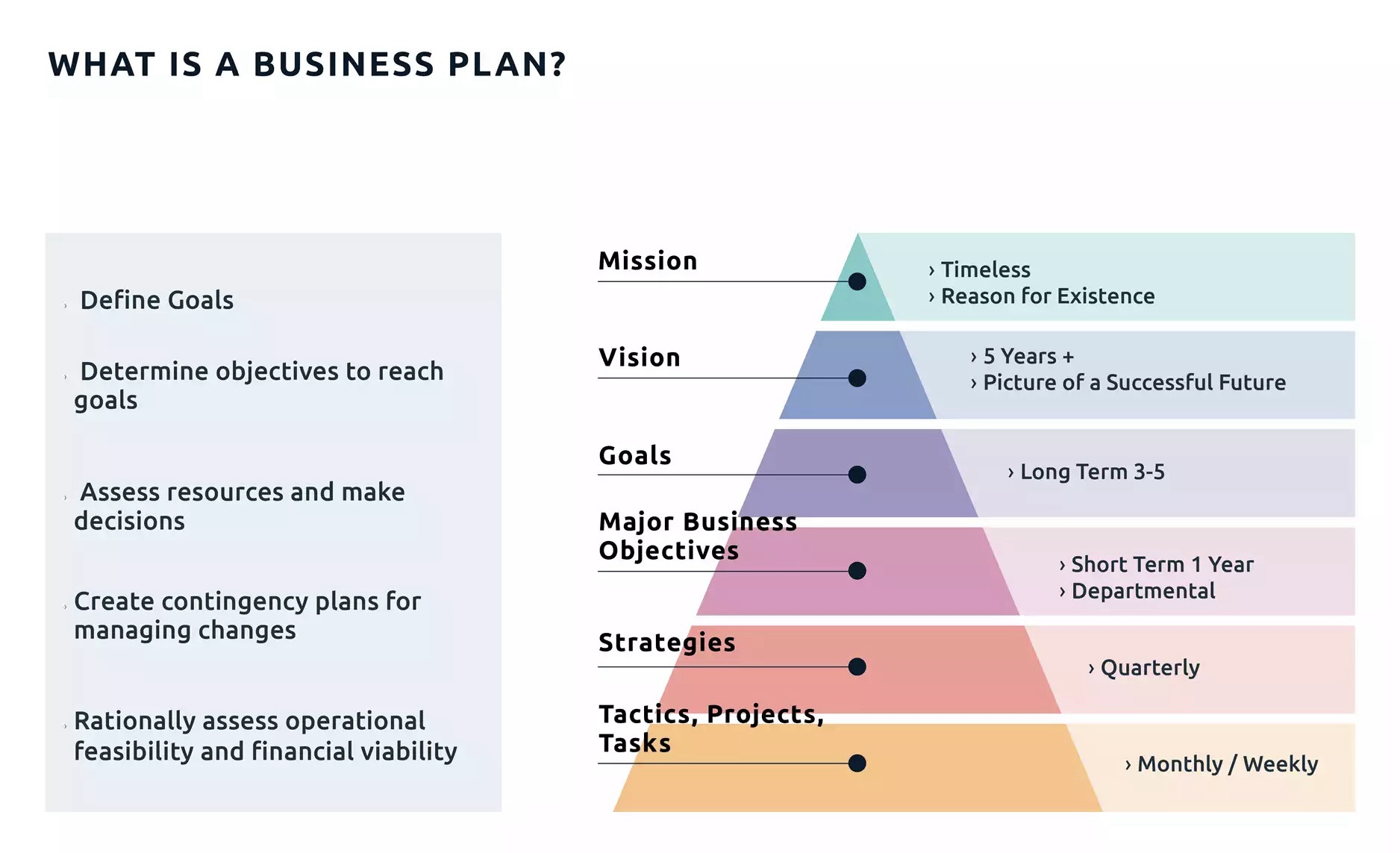
A roadmap is a strategic plan that defines a goal or desired outcome and includes the major steps or milestones needed to reach it. It also serves as a communication tool, a high-level document that helps articulate strategic thinking—the why—behind both the goal and the plan for getting there.

A business roadmap is a visual representation of your business strategy. It outlines the steps, goals, initiatives, and milestones needed to achieve your long-term plans. A business roadmap is also more tactical, focusing on how you will reach your objectives.

Eight Bukets – Challenge

Six – Create Value – Capture Value

I’m giving you the map, now you must walk the path

https://youtu.be/qllWAheHkms?si=fCkbOSRuRO5kZ0ol

The 80 – 20 Rule

https://www.investopedia.com/terms/1/80-20-rule.asp

Posted in software online review

Chromium

https://en.wikipedia.org/wiki/Chromium_(web_browser)

The One Investment Rule

https://youtu.be/IBD_AdM3WNI?si=xORYvpzXfwyYxO-a

Chromium org

https://www.chromium.org/chromium-projects/

browsing history

https://interestingengineering.com/culture/chatgpt-to-absorb-users-life-history

ghat gpt – gemini – missing personality

https://www.tomsguide.com/ai/i-switched-from-chatgpt-to-gemini-for-one-week-and-heres-why-im-going-back-to-chatgpt

Chromium base

https://www.pcmag.com/comparisons/chatgpt-vs-gemini-which-ai-chatbot-is-actually-smarter

Gemini

https://gemini.google.com/app/download

https://gemini.google/subscriptions/

Chat Gpt – Open AI

https://chatgpt.com/

https://openai.com/

https://en.wikipedia.org/wiki/OpenAI