Posted in Engineering

Zero-Copy I/O Explained: How High-Performance Systems Move Data Without Wasting CPU Cycles

Every time a web server streams a file, a message broker ships a log segment, or a CDN node serves a cached asset, the operating system has a choice: copy that data through the application’s own memory, or hand it off inside the kernel and skip the detour. The second option is “zero-copy” I/O, and it’s one of the quieter reasons systems like Kafka, Nginx, and Netty can push huge amounts of data without burning CPU cycles on work that never needed to happen.

At a Glance

What it solvesUnnecessary copying of data between kernel space and user space during I/O
Core Linux syscallssendfile(2), splice(2), mmap(2); newer workloads also use io_uring
Typical savingsEliminates the application-level copy steps (OS cache → app buffer → socket buffer) on the read/transfer path
PlatformLinux-specific syscalls (sendfile/splice); conceptually available on other Unix-likes with different APIs
Well-known adoptersApache Kafka, Netty, Nginx
Main trade-offLess flexibility — the data can’t be inspected or transformed by the application mid-transfer

The Problem: What a “Normal” Copy Actually Costs

A naive file-to-network transfer — read a file, then write it to a socket — looks cheap in code but isn’t cheap in hardware. As Kafka’s own design documentation and independent breakdowns of its internals describe, a conventional path pulls data from disk into the OS page cache, then copies it again into the application’s buffer, then copies it a third time into the socket buffer the kernel uses for the network stack, before the network card finally sends it. Each of those hops crosses the boundary between kernel space and user space, and each one costs CPU time and memory bandwidth to move bytes that the application never actually needed to touch — it was just a pass-through.

This matters most for high-throughput, pass-through workloads: a message broker relaying log segments to consumers, a static file server, or a proxy forwarding a response body. In all of these, the application doesn’t need to read or modify the bytes — it just needs to move them from point A to point B as fast as possible.

How Zero-Copy Works

Zero-copy techniques let the kernel move data directly — disk cache to network card, or one file descriptor to another — without routing it through a user-space buffer at all. The core Linux mechanism is the sendfile(2) system call:

#include <sys/sendfile.h>

ssize_t sendfile(int out_fd, int in_fd, off_t *offset, size_t count);

According to its Linux manual page, sendfile() “copies data between one file descriptor and another,” and because the data never travels to user space and back, it is more efficient than a matching pair of read(2) and write(2) calls. A related call, splice(2), moves data between two file descriptors where at least one is a pipe — its man page is explicit that the point is to move data “without copying between kernel address space and user address space,” by passing around reference-counted pointers to kernel memory pages rather than the page contents themselves. mmap(2) offers a third route: mapping a file directly into a process’s address space so reads happen via memory access instead of an explicit copying syscall. More recently, Linux’s io_uring interface has given low-level network and storage code another way to cut syscall and copy overhead, though it’s a broader asynchronous I/O framework rather than a drop-in replacement for sendfile().

Traditional read + writeZero-copy (sendfile)
Disk → OS page cacheYesYes
OS cache → application bufferYes (extra copy)Skipped
Application buffer → socket bufferYes (extra copy)Skipped
OS cache / socket buffer → NICYesYes, directly
Application touches the bytesYesNo

That table reflects the walkthrough popularized by engineering explainers of Kafka’s design: in the traditional path, data makes extra stops at the application layer and the socket buffer before reaching the network card; with sendfile(), the OS page cache hands data to the network card directly, and the broker process never has to allocate a buffer for it or touch it at all.

Real-World Uses

  • Apache Kafka — Kafka brokers lean on zero-copy transfer to move log segments from disk to consumers without the broker process copying the bytes through its own heap, which is a documented part of why a single broker can sustain very high read throughput.
  • Netty — Netty’s FileRegion abstraction represents a region of a file sent through a channel, and Netty’s own API documentation describes it as supporting zero-copy file transfer; it’s the mechanism behind efficient file-serving code built on Netty (which underlies parts of gRPC and many Java web servers).
  • Nginx — Nginx exposes a sendfile on; directive specifically so static file responses can be served via the kernel’s zero-copy path instead of being read into a worker’s buffer and written back out.

Trade-Offs and Limitations

  • No mid-flight processing. Because the application never sees the bytes, zero-copy only works for pure pass-through transfers — not for workloads that need to compress, encrypt, parse, or transform the data first.
  • Platform-specific. sendfile() and splice() are Linux syscalls with their own constraints (for example, sendfile()‘s input descriptor has historically needed to support mmap-like access, so it can’t be a socket); the man pages themselves warn against relying on sendfile’s exact semantics in portable code.
  • Partial transfers still happen. A single sendfile() call can transfer fewer bytes than requested, so correct code has to handle looping until the transfer completes, same as with write().
  • Not always a true zero-copy in practice. The splice(2) man page itself notes that actual page copies can still occur when the kernel can’t just move pages around — for instance when buffers don’t align to full pages.

Bottom Line

Zero-copy I/O isn’t a trick or a benchmark gimmick — it’s a direct consequence of recognizing that a lot of server-side work is pure data relay, and that every unnecessary copy between kernel and user space costs real CPU time and memory bandwidth at scale. For teams building anything that moves large volumes of bytes — a broker, a proxy, a file server — knowing that sendfile(), splice(), and friends exist (and why Kafka, Nginx, and Netty already use them) is a useful piece of systems literacy, even if you never call the syscall directly yourself.

FAQ

Is zero-copy I/O only relevant to C/systems programming?
No. Most developers encounter it indirectly — through a sendfile on; setting in Nginx, Kafka’s broker-side design, or a Java NIO/Netty file-transfer API — without ever calling the underlying syscall themselves.

Does zero-copy mean literally no copying happens anywhere?
No. Data still moves from disk into the OS page cache, and from there to the network card. What’s eliminated are the extra copies into and out of the application’s own user-space buffer.

Can I use sendfile() if I need to encrypt or compress the data first (e.g. TLS)?
Not directly — since the application never sees the bytes, it can’t transform them. That’s why plain zero-copy static file serving and TLS-terminated responses are handled by different code paths; some systems use kernel TLS (kTLS) offload to regain some of the benefit even with encryption, but that’s a separate mechanism from the plain sendfile/splice path described here.

Sources

Posted in Engineering

Consistent Hashing Explained: How Distributed Caches and Load Balancers Scale Without Full Rehashing

Add or remove one server from a cache cluster that uses naive hashing, and almost every key can end up pointing at a different node — triggering a stampede of cache misses. Consistent hashing is the technique that keeps this from happening, and it quietly runs underneath systems like Apache Cassandra, Amazon DynamoDB, and the client libraries behind memcached. Here is what it actually does, how it works, and where you’ll find it in production.

At a Glance

Problem solvedMass key remapping when nodes are added or removed from a distributed cache, store, or load balancer
Core ideaMap both nodes and keys onto a fixed circular hash space (a “ring”); a key belongs to the next node clockwise
Keys remapped on node changeRoughly 1/N of keys (N = number of nodes), versus nearly all keys with naive modulo hashing
Key refinementVirtual nodes (vnodes) — each physical node owns many positions on the ring instead of one
Known production usersAmazon DynamoDB (originally Dynamo), Apache Cassandra, memcached client libraries (Ketama), many CDN and load-balancer designs
OriginKarger et al., “Consistent Hashing and Random Trees” (1997), developed for web cache load distribution

The Problem: Why Naive Hashing Breaks at Scale

The obvious way to spread keys across N servers is hash(key) % N. It’s simple and balances load evenly — right up until N changes. Adding or removing a single server changes the modulus, which changes the bucket almost every key maps to. In a cache, that means a near-total wipeout: every client suddenly misses, hits the database at once, and the system can fall over from the resulting load spike. In a sharded data store, it means moving almost all the data in the cluster just to add one disk’s worth of capacity.

How Consistent Hashing Works

Consistent hashing fixes this by hashing nodes onto the same space as keys, rather than deriving a bucket from a count that can change.

  • Imagine a ring of hash values from 0 to some large maximum, wrapping back to 0.
  • Each server is hashed to one or more positions (tokens) on that ring.
  • Each key is also hashed onto the ring.
  • A key belongs to the first server found by walking clockwise from the key’s position — its “token range.”

When a server is added, it only takes over the token range immediately counter-clockwise from its new position — keys that used to belong to its clockwise neighbor. Every other server’s assignments are untouched. Apache Cassandra’s own architecture documentation describes this directly: in an eight-node ring with evenly spaced tokens, a key’s replicas are found by walking clockwise until three distinct nodes (for replication factor 3) are reached, and only the token range between two adjacent tokens needs to move when the ring changes.

Why One Token Per Node Isn’t Enough: Virtual Nodes

A ring with exactly one token per physical node has two practical problems, both laid out in Amazon’s original 2007 Dynamo design (via Werner Vogels’ engineering blog) and in Cassandra’s architecture docs: random placement produces uneven load across nodes, and it can’t reflect the fact that real hardware isn’t uniform — some nodes have more CPU, memory, or disk than others.

The fix is virtual nodes (vnodes): each physical node is assigned many tokens on the ring instead of one. Dynamo’s design ties the number of tokens a node holds to its capacity, so a beefier machine simply claims more positions and absorbs a proportionally larger share of keys. Cassandra’s documentation lists the same three benefits:

  • Failure handling: when a node goes down, its load spreads across many remaining nodes instead of dumping entirely onto one neighbor.
  • Rebalancing: a node that joins or returns takes a roughly equal slice of data from every other node, not just its ring neighbor.
  • Heterogeneity: a node’s vnode count can be set to match its hardware capacity.

Cassandra notes a real trade-off here too: more tokens per node means more neighbors on the ring (up to 2 × (RF−1) per token), which increases the number of node-failure combinations that can cause partial unavailability, and more discrete repair operations. Early Cassandra 2.x defaulted to 256 random tokens per node to keep balance; later versions added a deterministic token allocator that balances the ring with far fewer tokens, trading some of that flexibility for lower operational overhead.

A Simple Walkthrough

Picture a ring labeled 0 to 359 (like a clock face). Three nodes hash to positions 40, 160, and 280. A key that hashes to position 200 walks clockwise and lands on the node at 280. If a fourth node joins at position 100, it only absorbs the slice of keys between 40 and 100 — keys that used to belong to the node at 160. Nothing assigned to the nodes at 160 or 280 moves. That’s the entire benefit in one sentence: changing the ring only touches the token range next to the change, not the whole dataset.

Real-World Uses

SystemHow it’s used
Amazon DynamoDB (originally Dynamo)Core partitioning mechanism; virtual nodes sized to node capacity for incremental, low-disruption scaling
Apache CassandraToken ring with vnodes; SimpleStrategy and NetworkTopologyStrategy walk the ring to place replicas across nodes, racks, and datacenters
memcached client libraries (e.g. Ketama)Client-side consistent hashing so adding/removing a cache server doesn’t invalidate the whole cache
Load balancers / CDNsRoutes a given client or object key to a stable backend/edge node even as the pool of backends changes

Trade-offs to Know

  • Not perfectly even without vnodes: a small number of nodes with single random tokens can still produce uneven ranges; virtual nodes are what actually make load distribution smooth in practice.
  • More tokens, more neighbors: higher vnode counts spread load more evenly but widen the blast radius of correlated failures and increase repair/maintenance overhead, per Cassandra’s own documentation.
  • It solves placement, not consistency: consistent hashing decides which node a key belongs to; it says nothing on its own about replication guarantees, quorum reads/writes, or conflict resolution, which systems like Dynamo and Cassandra layer on top separately.

Bottom Line

Consistent hashing is a narrow, specific fix for a narrow, specific problem: keeping key-to-node assignment stable when the set of nodes changes. On its own it’s just a ring and a clockwise lookup; the engineering that makes it usable in production — virtual nodes, capacity-aware token counts, and allocator strategies that cap how many tokens a node needs — is what Dynamo and Cassandra actually spend their design effort on. If you’re building or evaluating a distributed cache, sharded store, or load balancer, the question isn’t whether it uses “consistent hashing” as a buzzword, but how it handles virtual nodes and rebalancing cost, since that’s where the real trade-offs live.

FAQ

Is consistent hashing the same as a hash table?
No. A hash table maps keys to array indices for in-memory lookup. Consistent hashing maps keys to nodes in a distributed system, specifically designed so that changing the number of nodes moves as few keys as possible.

Do I need virtual nodes, or is one token per node enough?
For anything beyond a handful of nodes, virtual nodes are what actually deliver even load distribution and capacity-aware placement in practice; single-token rings are mostly a teaching simplification at this point.

Does consistent hashing guarantee data isn’t lost when a node fails?
No — it only decides which node a key should live on. Durability and availability come from replication (storing a key on multiple nodes along the ring) and quorum logic layered on top, as in Dynamo and Cassandra.

Sources

Posted in Engineering

B-Trees vs LSM-Trees: How Databases Choose Their Storage Engine

Every database has to decide how it physically arranges data on disk, and that decision shapes everything else about its performance. Two structures dominate: the B-tree, which has backed relational databases for decades, and the LSM-tree, which newer, write-heavy systems adopted instead. Neither is strictly better; they trade off reads against writes in opposite directions.

At a Glance

B-TreeLSM-Tree
WritesIn-place page updates; slower under random writesAppend-only; fast sequential writes
ReadsSingle tree traversal; generally faster point/range readsMay check multiple files/levels; mitigated by Bloom filters
Background costOccasional page splits/mergesCompaction merges files, causing write amplification
Used byPostgreSQL, MySQL/InnoDB, SQLiteCassandra, RocksDB, LevelDB, HBase

How a B-Tree Storage Engine Works

A B-tree is a multi-way balanced tree where each level consists of pages connected by pointers; leaf pages hold the actual data (or pointers to it), and internal pages hold downlinks used to navigate to the right leaf. Inserting a row that doesn’t fit on its page triggers a page split, which can cascade upward through the tree and, in the worst case, add an entirely new root level. PostgreSQL’s B-tree implementation, for example, supports deduplication (merging duplicate key values into compact posting-list tuples) and, since version 14, “bottom-up index deletion,” which proactively removes version-churn tuples left behind by MVCC updates so pages don’t split unnecessarily. In practice, over 99% of a B-tree index’s pages are typically leaf pages. MySQL’s InnoDB storage engine uses B-trees for every index except spatial data (which uses R-trees); its default page size is 16KB, and it deliberately leaves roughly 1/16th of each page free on insert to absorb future growth, merging pages that fall below a configurable fill threshold. SQLite also uses B-tree pages for both its tables and its indexes.

How an LSM-Tree Storage Engine Works

A log-structured merge-tree takes a different approach: writes go first into an in-memory structure (a memtable) and an append-only commit log for durability, then flush to immutable, sorted files on disk called SSTables once the memtable fills up. A background compaction process periodically merges these SSTables, applying updates and deletes along the way, since the files themselves are never modified in place. Apache Cassandra uses this model, with a shared commit log across tables and a configurable sync mode (batch, which waits for an fsync before acknowledging a write, or periodic, which acknowledges immediately at the risk of data loss on a crash); a given partition’s data can be spread across several SSTables, each carrying a Bloom filter so reads can skip files that don’t contain the requested key. RocksDB, which underlies systems like MyRocks, TiDB, and CockroachDB, documents several compaction strategies: leveled (its default, which minimizes space amplification at the cost of higher write and read amplification), universal/tiered (lower write amplification, higher read and space amplification), and FIFO (built for cache-like data that simply expires). Neither Cassandra’s nor RocksDB’s official documentation gives a single universal write-amplification multiplier — it depends on the chosen strategy and tuning, so treat any specific number you see quoted elsewhere with some skepticism unless it cites its configuration.

Why the Trade-off Exists

B-trees update data in place, which keeps related data physically close together for fast reads but means random writes have to find and modify the right page on disk, sometimes triggering a cascading split. LSM-trees never modify data in place; they just append new data and let compaction clean up later, which makes writes fast and sequential (ideal for spinning disks and even SSDs) but means a read might have to check several files across multiple levels before it finds the most recent version of a key, and the background compaction work itself consumes disk I/O and CPU that would otherwise go to serving queries.

When Each One Is Preferred

B-trees fit workloads with a healthy mix of reads and writes, or read-heavy workloads where consistent, predictable read latency matters most — which is why they remain the default choice for general-purpose relational databases like PostgreSQL and MySQL. LSM-trees fit write-heavy workloads, such as event logging, time-series ingestion, or high-throughput key-value storage, where the ability to absorb a continuous stream of writes cheaply matters more than shaving milliseconds off every individual read.

Bottom Line

Neither structure is a universal winner; they encode opposite bets about whether your workload will stress reads or writes harder. Relational databases that need predictable read latency across varied queries default to B-trees, while systems built for ingesting large, continuous write volumes — wide-column stores, embedded key-value engines, and time-series databases — tend to default to LSM-trees.

FAQ

Why do LSM-trees need compaction?
Because writes are append-only and nothing is ever modified in place, old and updated versions of the same data accumulate across multiple SSTables. Compaction merges these files, discarding obsolete versions and keeping the number of files a read has to check under control.

Can a database use both structures?
Yes. Some systems let you choose a storage engine per use case (MySQL supports pluggable storage engines, for instance, with MyRocks offering an LSM-tree-based alternative to InnoDB’s B-tree), and some newer databases combine techniques internally.

Are Bloom filters only used in LSM-trees?
They’re most associated with LSM-trees, where they let a read skip SSTables that definitely don’t contain a given key, but the technique itself is general-purpose and shows up in other systems too.

Sources

Posted in software online review

Chromium – Base

It’s true—Chromium has become the “engine” powering approximately 80% of the global browser market. While initiated by Google, it is an open-source project, allowing other companies to skip the massive cost of developing their own rendering engines and focus instead on unique features. StatCounter Global StatsStatCounter Global Stats +5

Browsers Built on Chromium:

Beyond Google Chrome, prominent examples include:

  • Microsoft Edge: Switched to Chromium in 2020 for better web compatibility and extension support.
  • Brave: Focuses on privacy by automatically blocking ads and trackers.
  • Opera & Opera GX: Some of the earliest adopters after abandoning their custom “Presto” engine.
  • Vivaldi: Aimed at power users with extreme interface customization.
  • Samsung Internet: The dominant browser for Samsung mobile devices.
  • Arc: A modern browser that rethinks tab management and user experience. Efficient AppEfficient App +6

The Major Exceptions (Non-Chromium):

Only two major players still maintain their own independent engines:

  1. Mozilla Firefox: Uses its own Gecko engine.
  2. Apple Safari: Uses the WebKit engine. Interestingly, Chromium originally started as a fork of WebKit before they split into separate projects. RedditReddit +3

Why the Shift to Chromium?

The transition is driven by security, speed (specifically the V8 JavaScript engine), and a massive extension ecosystem. Maintaining a modern engine is so complex that even giants like Microsoft found it more efficient to adopt the Chromium base to ensure perfect website compatibility. Sahi ProSahi Pro +3

1. Privacy Differences (Brave vs. Vivaldi vs. Chrome)

While they are all built on Chromium, each browser handles your data differently:

  • Google Chrome: The least private. It integrates deep telemetry with your Google account and uses your browsing history for targeted advertising.
  • Brave: A “hardcore” approach to privacy. It blocks ads, trackers, and fingerprinting directly in the engine by default. It is also fully open-source.
  • Vivaldi: Focused on user control. It offers built-in blockers and granular permissions for every site. Unlike Brave, Vivaldi’s interface (UI) is not open-source, as noted in PCMag reviews.
  • Ungoogled Chromium: For maximalists—this is Chromium with every link to Google’s servers manually stripped out, though it requires manual updates.

2. The Monopoly Problem and Web Standards

Since Google controls Chromium’s development, it effectively sets the rules for the entire internet:

  • Dictating Standards: If Google introduces a new feature in Chromium (e.g., Privacy Sandbox), it overnight becomes the standard that web developers must follow. This makes it harder for Firefox (Gecko engine) to survive, as developers often optimize sites only for Chromium.
  • Manifest V3: Google recently changed how extensions work (Manifest V3), which complicates the effectiveness of traditional ad blockers. While Brave and Vivaldi strive to maintain old functionality, they are ultimately limited by what Google allows in the base code.
  • Antitrust Battles: Due to this dominance, the U.S. Department of Justice (DOJ) attempted to force Google to sell Chrome. However, according to rulings from September 2025, Google will not have to sell the browser but must share search data with competitors.

Conclusion: Which one to use?

If you want to escape Google’s influence, Firefox is the only true alternative with an independent engine. If you want Chromium’s speed but with privacy, Brave or the Mullvad Browser are the top choices for 2026.

https://www.chromium.org/getting-involved/download-chromium/

https://developer.apple.com/safari/resources/

https://chromium.woolyss.com/download/

https://download-chromium.appspot.com/

https://webkit.org/downloads

https://www.google.com/chrome/canary/

https://www.google.com/chrome/dev/

Posted in software online review

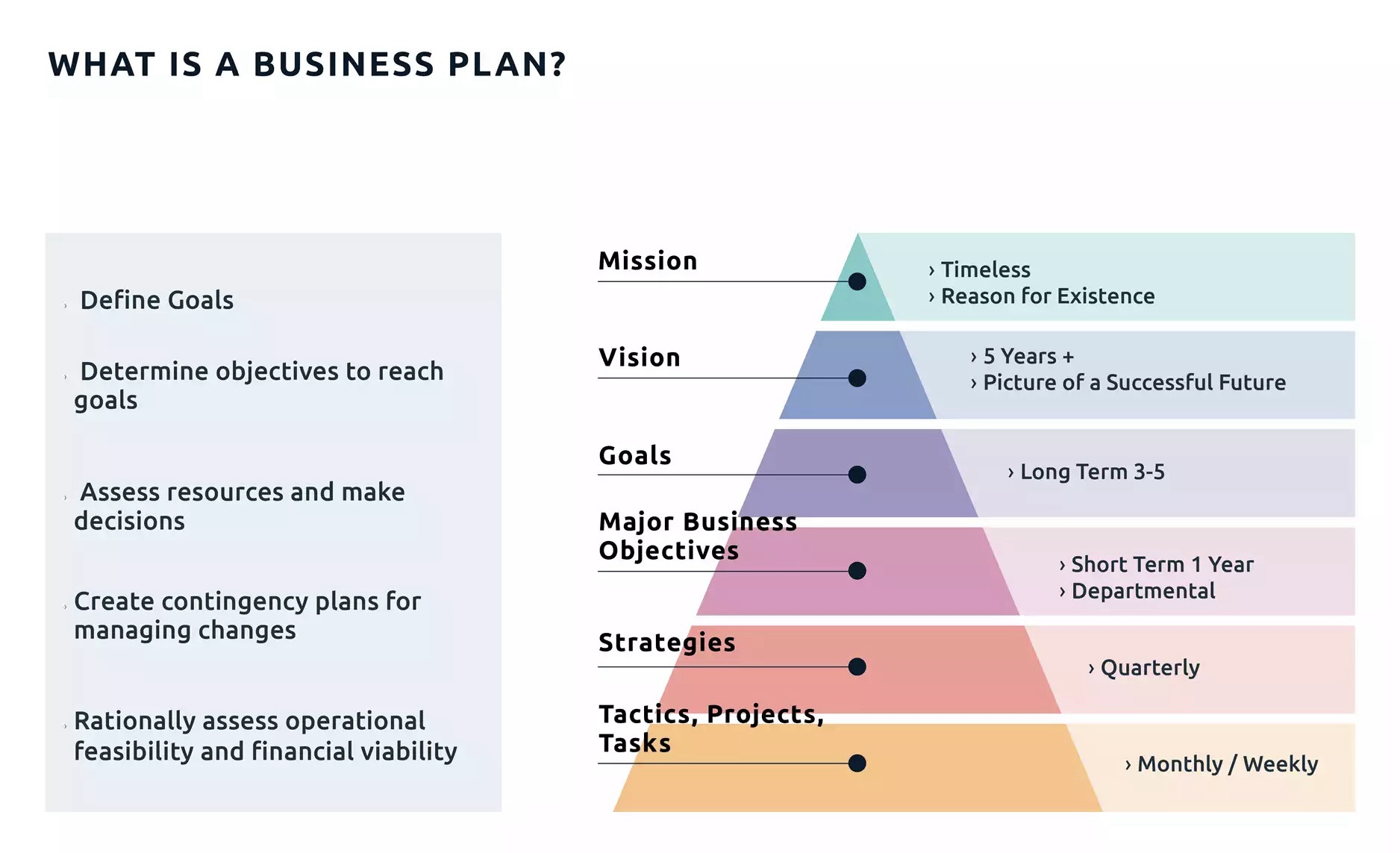
Roadmap and business roadmap

A roadmap is a strategic plan that defines a goal or desired outcome and includes the major steps or milestones needed to reach it. It also serves as a communication tool, a high-level document that helps articulate strategic thinking—the why—behind both the goal and the plan for getting there.

A business roadmap is a visual representation of your business strategy. It outlines the steps, goals, initiatives, and milestones needed to achieve your long-term plans. A business roadmap is also more tactical, focusing on how you will reach your objectives.

Eight Bukets – Challenge

Six – Create Value – Capture Value

I’m giving you the map, now you must walk the path

https://youtu.be/qllWAheHkms?si=fCkbOSRuRO5kZ0ol

The 80 – 20 Rule

https://www.investopedia.com/terms/1/80-20-rule.asp

Posted in software online review

Chromium

https://en.wikipedia.org/wiki/Chromium_(web_browser)

The One Investment Rule

https://youtu.be/IBD_AdM3WNI?si=xORYvpzXfwyYxO-a

Chromium org

https://www.chromium.org/chromium-projects/

browsing history

https://interestingengineering.com/culture/chatgpt-to-absorb-users-life-history

ghat gpt – gemini – missing personality

https://www.tomsguide.com/ai/i-switched-from-chatgpt-to-gemini-for-one-week-and-heres-why-im-going-back-to-chatgpt

Chromium base

https://www.pcmag.com/comparisons/chatgpt-vs-gemini-which-ai-chatbot-is-actually-smarter

Gemini

https://gemini.google.com/app/download

https://gemini.google/subscriptions/

Chat Gpt – Open AI

https://chatgpt.com/

https://openai.com/

https://en.wikipedia.org/wiki/OpenAI