
https://deepmind.google/models/gemini/pro/


Independent reviews of WordPress plugins, SaaS tools, and the compliance rules behind them

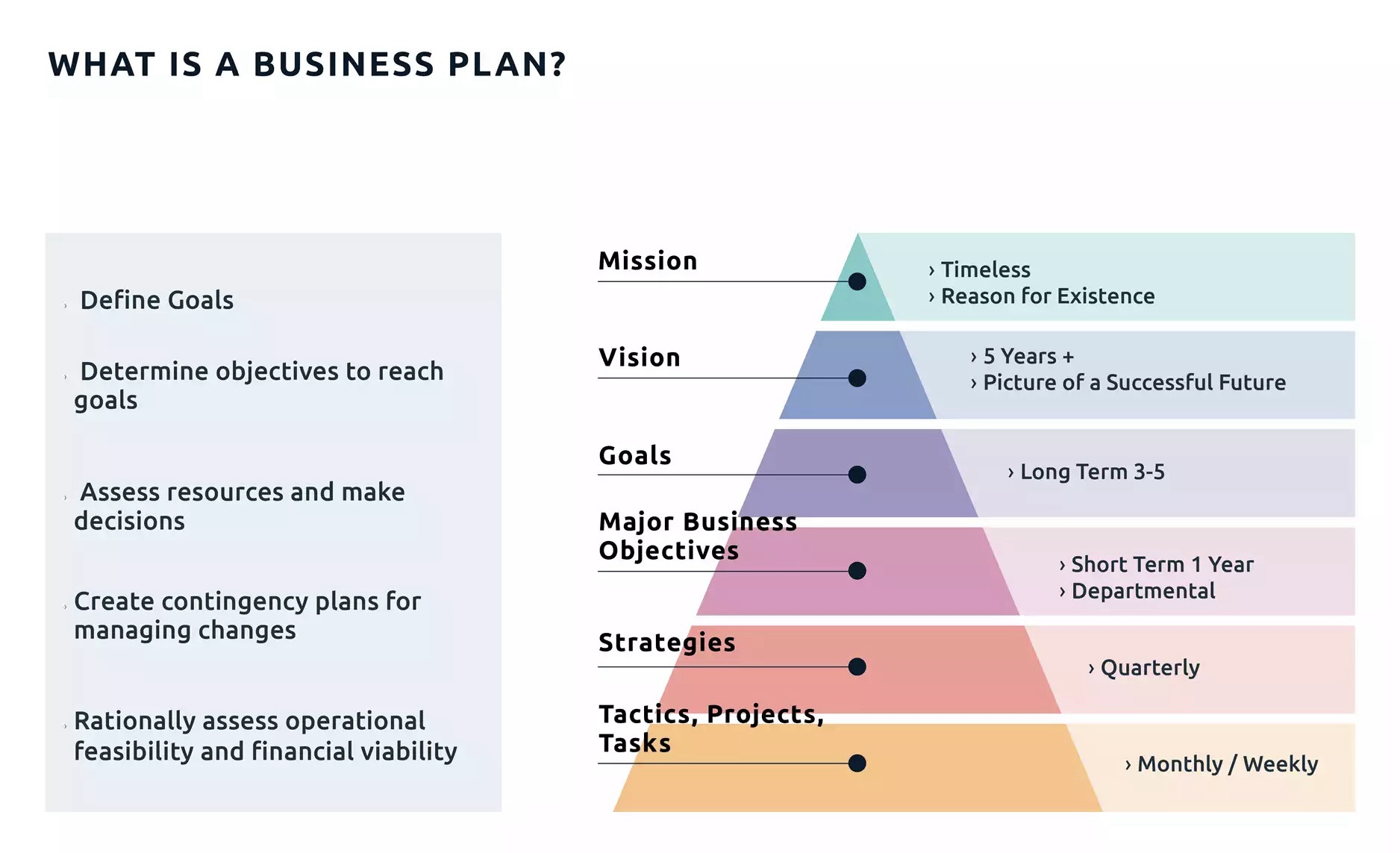
A roadmap is a strategic plan that defines a goal or desired outcome and includes the major steps or milestones needed to reach it. It also serves as a communication tool, a high-level document that helps articulate strategic thinking—the why—behind both the goal and the plan for getting there.

A business roadmap is a visual representation of your business strategy. It outlines the steps, goals, initiatives, and milestones needed to achieve your long-term plans. A business roadmap is also more tactical, focusing on how you will reach your objectives.

Eight Bukets – Challenge

Six – Create Value – Capture Value
I’m giving you the map, now you must walk the path
https://youtu.be/qllWAheHkms?si=fCkbOSRuRO5kZ0ol
The 80 – 20 Rule

https://en.wikipedia.org/wiki/Chromium_(web_browser)

The One Investment Rule
https://youtu.be/IBD_AdM3WNI?si=xORYvpzXfwyYxO-a
Chromium org
https://www.chromium.org/chromium-projects/
browsing history
https://interestingengineering.com/culture/chatgpt-to-absorb-users-life-history
ghat gpt – gemini – missing personality
Chromium base
https://www.pcmag.com/comparisons/chatgpt-vs-gemini-which-ai-chatbot-is-actually-smarter
Gemini
https://gemini.google.com/app/download
https://gemini.google/subscriptions/
Chat Gpt – Open AI
Verdict: Netlify is a strong choice for hosting static sites and front-end projects that deploy from Git, and its free plan is enough to try it properly. The catch in 2026 is the credit-based pricing, which makes your bill depend on traffic and deploys. Check your expected usage before you rely on the free plan for anything important. Official site: Netlify.
Netlify is a web hosting and deployment platform. You connect a project, push your code, and Netlify builds and publishes it on a global CDN. It also runs serverless functions, so you can add back-end logic without managing a server.
It suits front-end developers, freelancers building client sites, and small teams working with static site generators and modern JavaScript frameworks. It is less suited to people who want a traditional all-in-one WordPress host or who need full control of a server, where a virtual machine is a better match.
Prices are in US dollars and billed monthly, according to Netlify’s pricing page. Plans include a monthly pool of credits, and usage draws it down. Netlify’s documentation lists these costs: 15 credits per production deploy, 20 credits per GB of bandwidth, 2 credits per 10,000 web requests and 10 credits per GB-hour of compute. Deploy previews, branch deploys and failed deploys are not charged.
| Plan | Price (USD, monthly) | Included credits | Notes |
|---|---|---|---|
| Free | $0 | 300 per month | Hard limit, no credit packs |
| Personal | $9 | 1,000 per month | One person; extra credits 500 for $5 |
| Pro | From $20 | 3,000 per month | Unlimited team members; extra credits 1,500 for $10 |
| Enterprise | Custom | Custom | SSO, SLA and dedicated support |
Pro has higher tiers, for example 5,000 credits for $33 per month and 20,000 for $126, and rollover of unused credits applies only to Pro tiers of 5,000 credits or more. An important detail: on the free plan, when the 300 credits run out, Netlify’s documentation says your web projects are paused and visitors see a Site not available page until credits reset at the next billing cycle.
We did not verify the current limits of these services for this article, so compare their official pricing pages against your expected traffic.
Yes, there is a free plan at $0 with 300 credits a month. It works as a hard limit, and you cannot buy extra credits on it.
On the free plan, projects are paused until the next cycle. On Personal and Pro, Netlify’s documentation says auto-recharge is what keeps projects active once the monthly credits are used, so consider turning it on and setting your own budget limits.
Not on Pro. Netlify lists unlimited team members on Pro at the plan price. Personal is for one person.
You can add dynamic behaviour through serverless functions and a database, but the platform is built around front-end deployments. Check that your project fits that model first.
Netlify remains one of the easiest ways to publish a modern website from a Git repository. The free plan is good for learning and small projects, and Pro is reasonable for a team. Just estimate your bandwidth and deploy count against the credit costs first, so the pricing model does not surprise you.